
When you create a new level, you will be brought up to the “Create a level” menu screen, where you can edit the level’s properties.
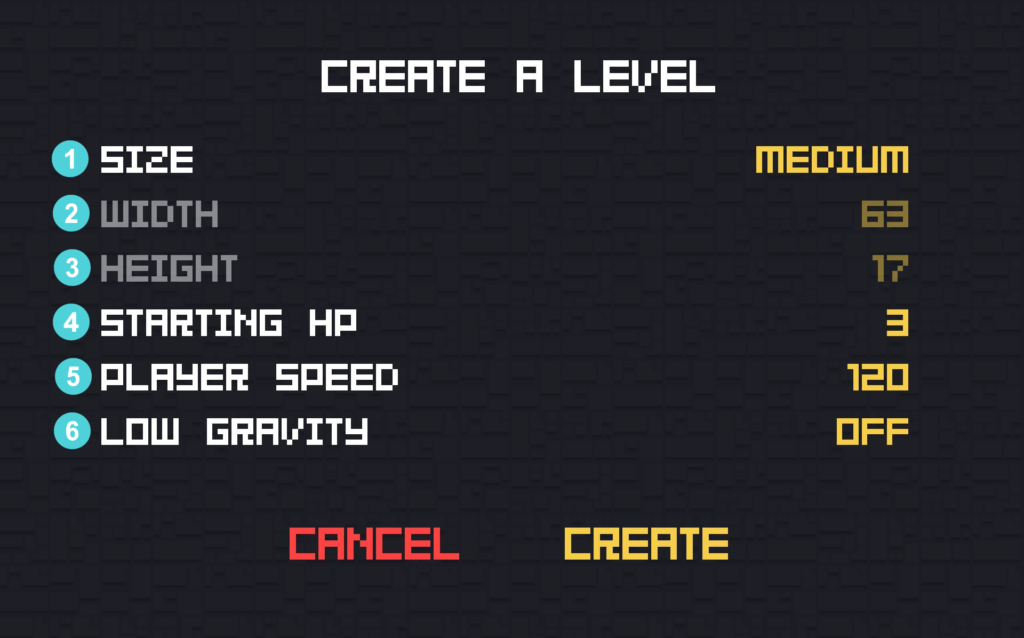
1 – Size – Pick your level’s size. You can use the level sizes found in Deep’s official chapters or use custom width (2) and height (3). Premade sizes are Small 30 x 17 (Found in Levels 1 – 10 in any chapter with some exceptions), Medium 63 x 17 (Found in Levels 11 – 19 in any chapter), or Large 144 x 17 (Found in Levels 20 in chapters I and III)
2 – Width – Number of tiles that the level spans in the X (horizontal) direction. It is automatically updated by the Size option, or it can be a custom value (Min 2, Max 200).
3 – Height – Number of tiles that the level spans in the Y (vertical) direction. It is automatically updated by the Size options, or it can be a custom value (Min 2, Max 200).
4 – Starting HP – The number of HP the player has at the beginning of the level. The HP can change if the player picks up a Health Item. Ranges from 1 to 3. The default value is 3.
5 – Player Speed – Player’s speed in pixels per second. Ranges from 20 to 300. The default value is 150.
6 – Low Gravity – Enables or disables the low gravity mode. It slows the player’s falling speed. The default value is off.
Properties set in this menu cannot be changed after the level has been created.
Added in 5.2.0